
Changelog

Follow new updates and improvements to itrvl.

Edit Services Reimagined, the New Client Portal, and More

Here's what we're shipping this week: a brand-new way to add services to your itineraries, the redesigned client portal, and a handful of improvements across itrvl.

📬 Check your inbox: for a full visual tour of the new client portal and Edit Services, take a look at the email we sent you.

✨ What's New

Edit Services, Reimagined

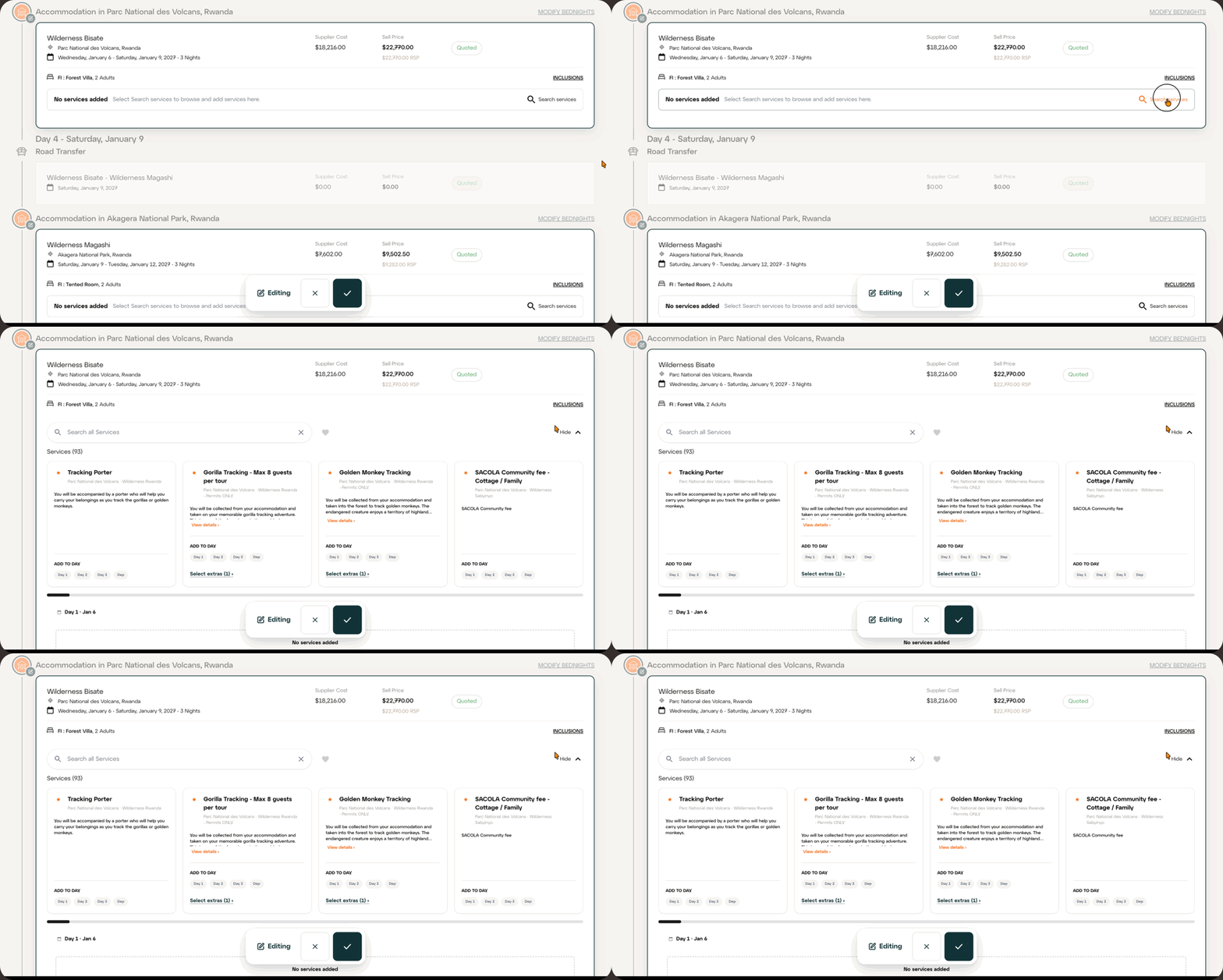
Adding services is now faster and happens right inside Trip Details. Open Edit Services and every accommodation and transit point can be edited in place, then one save covers the whole itinerary.

  • Smart recommendations: starred services are the most booked at each location for your traveller type (couple, family, honeymoon and more).

  • Preferred services: use the heart to see only your preferred services.

  • Extras made clear: mandatory extras are added automatically, and optional extras are clearly marked.

  • More detail: click View details to see photos and the full description before adding a service.
Read the full guides: Edit Services (Africa) and Edit Services (Jacada Rest of World)

The New Client Portal

The client portal has been redesigned to match the website, so your clients enjoy one consistent journey from enquiry through to booking. Highlights include brand-new accommodation profiles with header videos, room types, highlights and experiences at camp, new photo galleries, and Itinerary at a Glance. It looks great on desktop, tablet and phone.

Featured Images in Content Manager

Content Manager has a new Featured Images tab for Itinerary Header, Document Header and Document Divider images across every country and region, so it's easy to see where imagery is missing and fill the gaps.


🛠️ Improvements & Fixes

  • Accommodation profiles opened from an itinerary now show only the rooms booked on that stay, plus any available upgrades.

  • Various small improvements to payments handling.

  • AI Chat improvements.


As always, reach out through the support widget if anything looks off or you have questions. More to come!

New

Introducing the itrvl Help Center, Changelog, and Trivi AI Support

What's New

Help Center

A fully searchable library of step-by-step guides covering everything from building your first itinerary to managing invoices and payments. Browse by collection or search using natural language to find exactly what you need.

Visit the Help Center: help.itrvl.com

Trivi AI Support Agent

Meet Trivi, your new AI-powered support assistant built right into itrvl. Trivi is trained on our full knowledge base and months of real support conversations, so it can answer most questions instantly. Just open the support widget and type your question.

If Trivi can't fully resolve your issue, the conversation is automatically handed to a member of the itrvl support team.

In-App Support Widget

A support widget is now available on every page inside itrvl. Click the chat bubble in the bottom-right corner to access:

  • Home tab with quick links and featured content

  • Messages tab for live conversations with Trivi and the support team

  • Help tab to search and browse help articles without leaving itrvl

  • Changelog tab to stay up to date on product updates (like this one)

For a full walkthrough of everything the widget can do, check out our guide: How to use the Help Center and support widget in itrvl.

Changelog

You're reading it! From now on, all product updates, new features, and improvements will be posted here. Subscribe to get notified when we ship something new.

Why This Matters

Instead of searching through Slack threads or waiting for a reply, you now have three instant support paths: search the Help Center, ask Trivi, or start a conversation with the team. All from the same widget, on every page, at any time.

We will continue adding new articles and training Trivi on new content as the platform evolves. If you have suggestions for topics you'd like covered, let us know through the support widget.

New

itrvl April 22 release: itrvl Edge and Expanded Payment Methods

We're excited to announce three major new features:

Introducing itrvl Edge

  • (1) Improved Saved Itineraries: The "Edge Catalog" replaces "Saved Itineraries," offering advanced functionality:

    • Browse favorite or recommended itineraries on your account.

    • Utilize AI Chat or filters to find the perfect fit for your client.

    • View details, check availability, and generate quotes that come with all logistics, activities, and presentation edits from the original itinerary.

Expanded Payment Methods

  • (2) SEPA and BACS Transfers:

    • Clients paying in GBP and EUR can now benefit from automated bank transfer options.

    • Includes the same discounts as wire transfers while improving efficiency for fund processing.

  • (3) Buy Now, Pay Later:

    • Now available for USD trips under $50k, enabling clients to finance their entire trip with Flex Pay, a partnership with Uplift.com.

    • Clients receive a loan from Flex Pay and a virtual credit card for trip payment.

    • Only available for full trip payments, not an option to finance partial (i.e. deposit-only).